
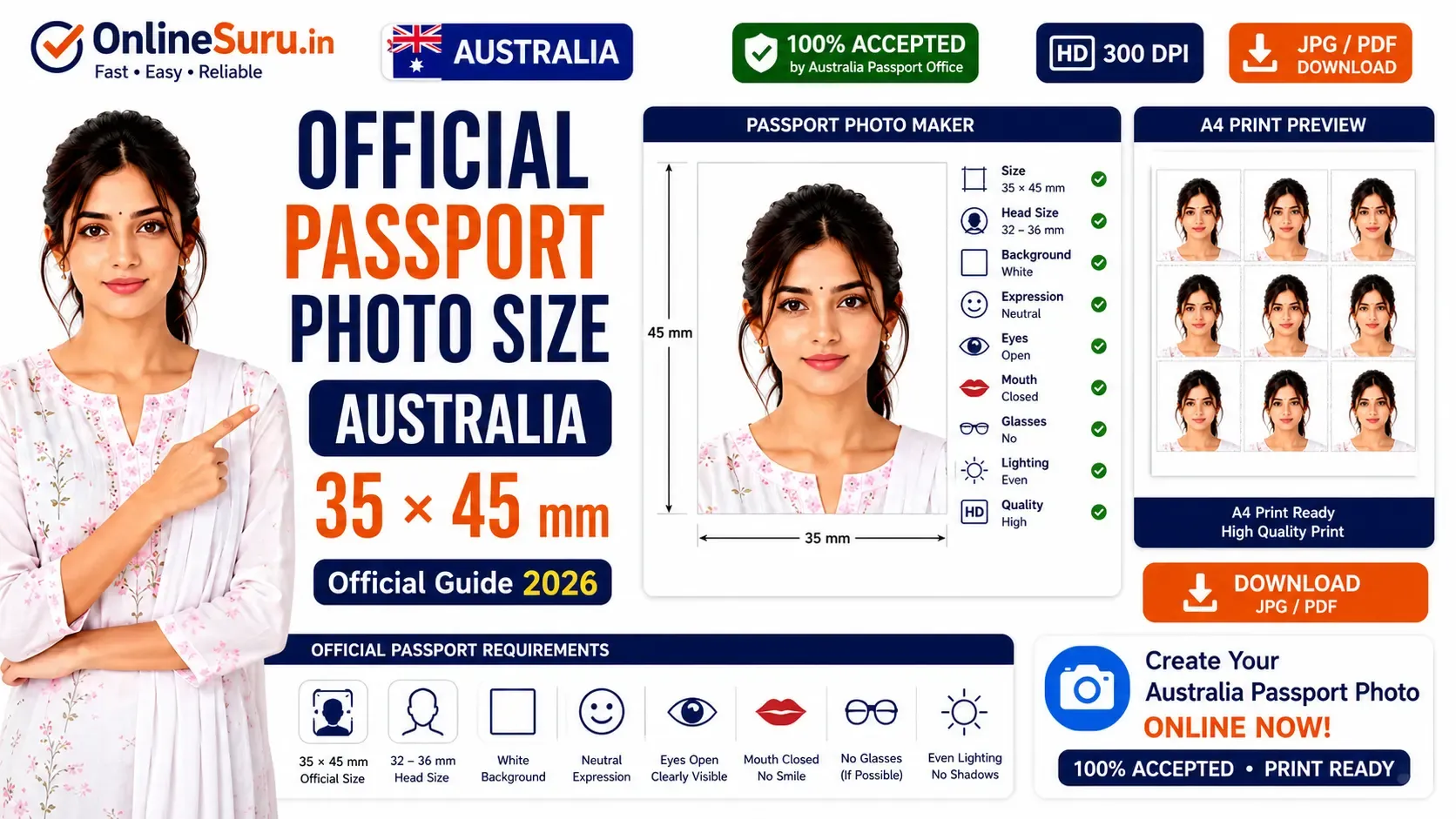
Australia Passport Photo Size (2026): Official 35×45 mm Requirements & Free Passport Photo Maker
Applying for an Australian passport or visa requires a passport photo that meets the official standards set by the Australian Government. Even a small mistake—such as the wrong photo size, incorrect background, poor lighting, or an improper facial expression—can delay or even cause your application to be rejected.
The standard Australian passport photo size is 35 mm × 45 mm. Your face must be centered, clearly visible, and captured against a plain white background with proper lighting. If you are applying online or at an Australia Post office, using the correct passport photo specifications is extremely important.
In this complete 2026 guide, you'll learn everything about Australian passport photo requirements, official dimensions, background colour, face size, printing rules, digital photo specifications, and how to create a passport photo online for free using the OnlineSuru Passport Photo Maker.
Australia Passport Photo Size Requirements (2026)
| Requirement | Official Standard |
|---|---|
| Photo Size | 35 × 45 mm |
| Background | Plain White |
| Face Size | 32–36 mm |
| Resolution | 300 DPI |
| Format | JPG / JPEG |
| Expression | Neutral |
| Eyes | Open |
| Glasses | Not Recommended |
| High Quality Photo Paper |
What is the Official Australia Passport Photo Size?
The official Australian passport photo must measure 35 mm wide and 45 mm high.
The applicant's face should occupy approximately 32 mm to 36 mm from the chin to the top of the head. The head should be centered, and there should be enough space above the head while keeping the face clearly visible.
Using an incorrect size is one of the most common reasons passport applications are rejected.
Australia Passport Photo Background Requirements
Your passport photo background should always be:
- Plain white
- Clean
- No patterns
- No objects
- No shadows
- Even lighting
Avoid using coloured walls, curtains, furniture, or textured backgrounds.
Face Position Guidelines
For an acceptable Australian passport photo:
- Face directly toward the camera.
- Keep your head straight.
- Look directly into the lens.
- Both eyes should be fully visible.
- Mouth must remain closed.
- Maintain a natural facial expression.
Do not tilt your head or look sideways.
Lighting Requirements
Proper lighting plays a very important role in passport photos.
Use:
- Natural daylight
- Soft lighting
- Balanced brightness
- No flash reflection
- No shadows behind the head
Poor lighting often results in photo rejection.
Dress Code for Australian Passport Photo
There is no official dress code, but the following is recommended:
- Wear everyday clothing.
- Avoid white clothes if they blend into the white background.
- Do not wear uniforms.
- Avoid hats or caps unless worn for religious reasons.
- Keep shoulders visible.
Simple clothing generally produces the best passport photo.
Glasses Rules
The Australian Government recommends removing glasses before taking your passport photo.
If glasses are medically necessary:
- Eyes must remain fully visible.
- No reflections on the lenses.
- No sunglasses.
- No dark or tinted lenses.
Digital Australia Passport Photo Requirements
For online passport applications:
- JPEG format
- High-resolution image
- Good lighting
- No filters
- No editing
- Sharp focus
- Correct proportions
The photo should accurately represent your current appearance.
Common Reasons for Passport Photo Rejection
Avoid these common mistakes:
- Wrong photo dimensions
- Dark or coloured background
- Blurry image
- Low resolution
- Smiling
- Closed eyes
- Head tilted
- Hair covering the face
- Glass reflections
- Heavy editing or beauty filters
- Old photograph
Following the official specifications will greatly improve the chances of your passport application being accepted.
How to Create an Australia Passport Photo Online
Creating an Australian passport photo online is quick and easy.
Step 1
Upload your photo.
Step 2
Select Australia Passport Size (35 × 45 mm).
Step 3
Adjust the crop automatically.
Step 4
Remove or replace the background with plain white.
Step 5
Preview your passport photo.
Step 6
Download it as JPG or PDF.
Step 7
Print it on high-quality photo paper.
Why Choose OnlineSuru Passport Photo Maker?
OnlineSuru helps you create professional passport photos in seconds.
Features include:
- Official Australia passport size
- Automatic face detection
- AI background remover
- Auto crop
- High-resolution export
- JPG & PDF download
- A4 print sheet
- Completely online
- No software installation
- Free to use
Australia Passport Photo Tips
- Use natural daylight whenever possible.
- Stand about one metre away from the background.
- Keep the camera at eye level.
- Do not use beauty filters.
- Keep your hair away from your eyes.
- Ensure the image is sharp and clear.
- Always review the photo before downloading.
Frequently Asked Questions (FAQ)
What is the official Australia passport photo size?
The official size is 35 mm × 45 mm.
What background colour is required?
A plain white background.
Can I wear glasses?
It is recommended to remove glasses. If medically necessary, ensure there is no glare.
Can I smile?
No. Maintain a neutral expression.
Can I use my mobile phone?
Yes. A modern smartphone camera is acceptable if the final image meets all official requirements.
Can I print the passport photo at home?
Yes. Print it on high-quality photo paper using the correct dimensions.
What file format should I use?
JPEG (JPG) is the recommended format.
Can I edit my passport photo?
Only basic cropping and background adjustment should be done. Do not alter your facial features.
How recent should my passport photo be?
It should accurately reflect your current appearance and ideally be taken recently.
Is OnlineSuru Passport Photo Maker free?
Yes. You can create Australian passport photos online for free.
Create Your Australia Passport Photo Online
🟢 Create Australia Passport Photo Now
➡️ Use OnlineSuru Passport Photo Maker
Related Guides
Conclusion
Creating a passport photo that meets Australia's official requirements is essential for avoiding delays or rejections during your passport or visa application. By following the correct 35 × 45 mm dimensions, using a plain white background, maintaining a neutral expression, and ensuring high image quality, you can submit a photo that complies with official standards.
With OnlineSuru Passport Photo Maker, you can crop, resize, remove the background, and download a print-ready Australian passport photo in just a few clicks. Whether you're applying for a new passport, renewing an existing one, or preparing a visa application, our free online tool helps you create an accurate, professional, and government-compliant passport photo quickly and easily.
IMPORTANT LINKS
| OPEN LINK | Click HereNEW |